


Tooltester is supported by readers like yourself. We may earn an affiliate commission when you purchase through our links, which enables us to offer our research for free.
Are you ready to take the plunge and build your very own website? Congratulations!
But with so many website builders out there, how do you choose the best one for your needs? Fear not, dear reader! We’ve reviewed all the top website builders. Our goal is to help you find the website builder that makes most sense for your business, so you don’t waste money (or time!).
10 Best Website Builders of 2024
- Wix – Best overall website builder
- Squarespace – Best for creatives and bloggers
- GoDaddy Website Builder – Great marketing tools
- Hostinger Website Builder (previously Zyro) – The budget choice
- Webnode – Very affordable and great for multilingual sites
- Strikingly – Build multiple websites cheaply
- Jimdo – Fastest way to build a website
- IONOS – Comes with a good variety of marketing tools
- Webflow – Best website builder for designers
- WordPress.com – Complex but very powerful
And since we get this question frequently: No, hypercomplex sites like Airbnb, eBay, or Facebook are completely out of reach. You’ll need to hire a development team to build a website like that.
So which one is the best website builder for you, and which ones should you avoid?
Find your favorite in our website builder ranking table
| # | Website Builder | Pricing | Pros and Cons |
|---|---|---|---|
| 1 |
Our Top Pick Try for free |
Tip: Save 10% using discount code “TOOLTESTER10!” |
|
| 2 |
Excellent for Blogging Try for free |
Tip: Save 10% using discount code “TOOLTESTER10” |
|
| 3 | 
Getting Better All The Time Try for free |
|
|
| 4 |
The Affordable Newcomer Try Now |
|
|
| 5 | 
The Polyglot Website Tool Try for free |
|
|
| 6 |
Excellent for One-pagers Try for free |
|
|
| 7 | 
Create a Website in No Time Try for free |
|
|
| 8 | 
Websites for businesses Try for free |
|
|
| 9 | 
Ideal for Freelance Designers Try for free |
|
|
| 10 |
WordPress for Starters Try for free |
|
|
| 11 | 
Unmatched ease of use Try for free |
|
|
| 12 | 
The Language Genius Try for free |
|
|
| 13 | 
The Budget Site Builder Try for free |
|
|
| 14 |
Good for Languages Try for free |
|
|
| 15 | 
Wix’s Little Brother
|
|
|
| 16 | 
Web.com The Deceiving One
|
(Discounted rates for the first month available) |
|






A quick note about the prices you see here: they are usually charged yearly.
A brief guide to finding the best website builder
Now that you’ve seen our ranking table, you might still be left wondering how to actually choose the best website builder for your specific project.

Video: How to find the best website builder (3:58 min)
Here’s the good news: choosing a website builder is relatively risk-free nowadays. However, there are a couple of things that you should be looking into before deciding:
- Free Trial: Make sure you can try the site builder for free. Most providers offer free plans (with some limitations) or at least a money-back guarantee policy. Personally, I’d avoid site builders that require your credit card details for a trial as this is not very common in the industry.
- Support: Check which kind of support the website builder offers (e.g. phone, chat, forums, etc.). It’s worth testing the support before you commit to a paid plan.
- Price: Generally you are paying for the website builder package, the domain name and email accounts (which are optional). The prices you’ll find are sometimes a bit confusing. However, in all our website builder reviews, you’ll find clear details of the pricing plans and extra costs (e.g. domain name) for each provider.
- Features: Obviously each project will have different needs. But here are some of the common things you may be looking for: a decent blogging system, customizable SEO options, mobile-friendly designs, a shopping cart, decent image galleries, possibility to password-protect pages or having registered users.
- Domain name: You should be able to connect domain names purchased elsewhere, even if you can register a new domain with the web builder directly. More information.
- Email accounts: if you’re using your website for business you will want an email address with your domain name instead of [email protected]. Further down we lay out some handy tips regarding email addresses.
- Cancellation policy: usually there is a free plan to try the site builder, a 14-days money-back guarantee, or even both. If that’s not the case, you should be slightly suspicious. Cancellations by phone only are another no-go we will call out.
Tip #3: Interested in video tutorials to create your website? You’re in luck! Currently, we have a Squarespace tutorial and another one for Wix.
The top website builders for small business – our detailed study
Let’s now take a more detailed look at our research. These are the best (and worst) website builders:
1. Wix
Our Top Pick

 We awarded Wix our Best Website Builder badge for 2023!
With 200m users, Wix is certainly the biggest website builder out there. They’ve come quite a long way from being a niche product to almost becoming a household brand.
The thing we like most about Wix is the flexibility and choice of themes for small businesses. Combining these two features gives you virtual (and visual!) superpowers. Wix enables even novices to create very presentable websites – more than any other website builder we have reviewed.
That, combined with its SEO-friendliness (meaning you have all the tools at your hand to get Google traffic), makes Wix the best website builder on Tooltester.
Compared to other website builders, it does have its price but we think it can be worth it if you take advantage of its large range of features.
What our readers think of Wix
The great majority of our readers enjoy using Wix and rave about the great choice of designs and features. But some are very vocal about the issues they have with the platform. Often it’s related to the editor, which features a broad range of options and settings. This feels overwhelming to some of our readers.
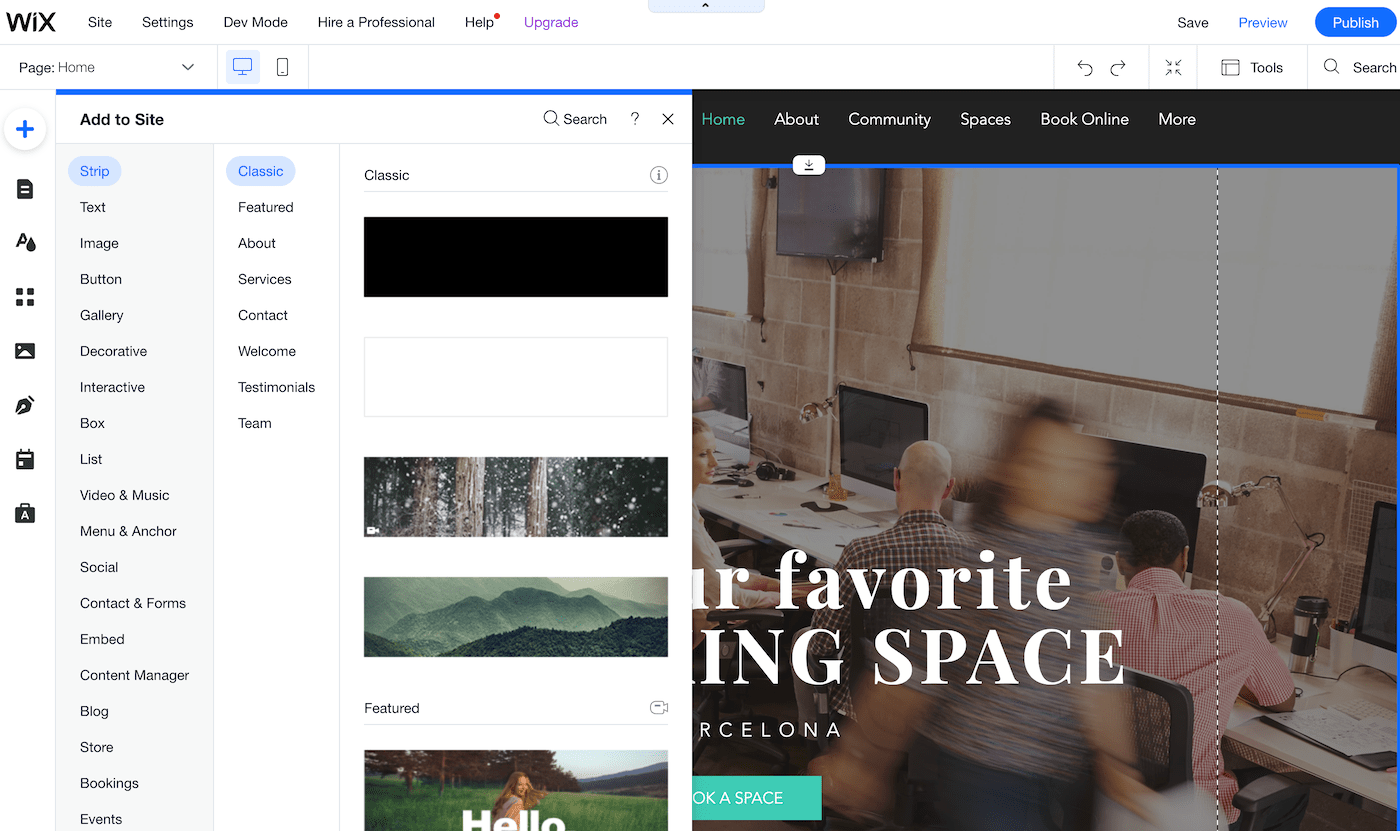
Others state they are not receiving good customer support as it sometimes requires several emails to get to the core of the issue.
Who should use Wix?
Wix is extremely versatile. We found that typical users are freelancers and small businesses – anyone who wants to build an impressive website or portfolio with little effort. Wix offers hundreds of professional themes for you to customize. It’s very likely you will find the style you are looking for in their enormous template selection.
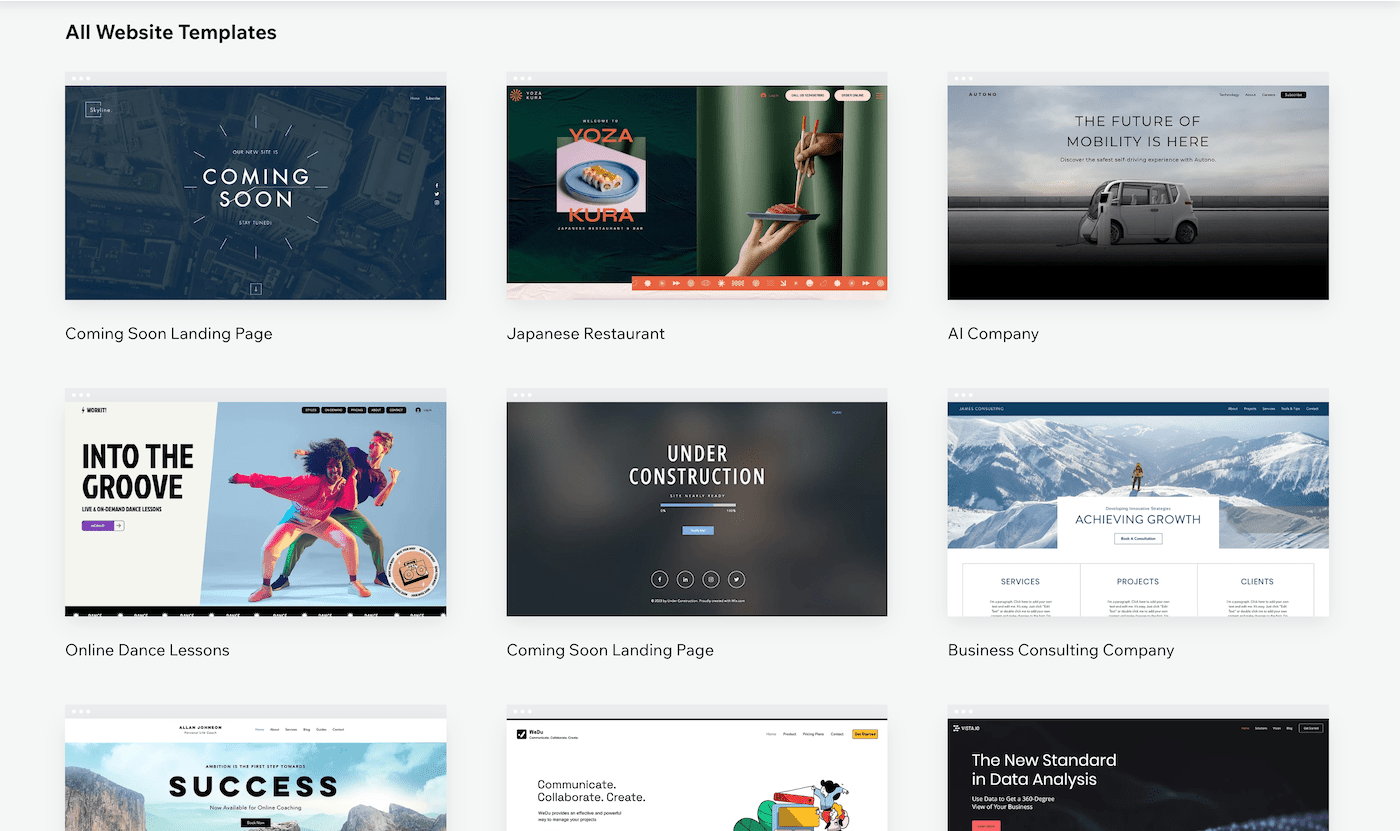
It’s also a good choice if you want to receive online payments, e.g. selling products via their online store, selling appointments via Wix Bookings, or even creating a members area where you charge for premium content. These features really set Wix apart from its competitors.
Who shouldn’t use Wix?
Wix is not the cheapest website builder, so if you have a limited budget and only need a simple website, you should probably look at Webnode, One.com or Weebly. Our research shows that these are good Wix alternatives for price-conscious users.
Wix features a blogging tool, which is quite good (in fact, we use it ourselves on Tooltester.net). But if your main goal is to become a blogger we’d recommend checking out Squarespace or WordPress.
Wix Pricing
The big advantage of Wix is that there is a free plan that lets you build a working website. You can try out most features and build your website without any pressure. Once you are happy with the result you can upgrade to a premium plan.
If you are looking for an ad-free website with a custom domain, Wix Light ($16/month) is typically the best plan for you. Be aware that Wix heavily promotes the higher, more expensive plans, which are usually not necessary (this is based on the user feedback and requirements we receive).
These are all of Wix’s pricing options:
- Free: $0
- Light: $16/month
- Core: $27/month
- Business: $32/month
- Business Elite: $159/month
Noteworthy Features
Hardly a month passes without Wix announcing a major new feature. Among them: the aforementioned Wix Bookings, a convenient self-service appointment booking system for your clients; and Wix Restaurants, a (commission-free) add-on that lets your customers book tables, order food from you, and check out your menus. All these can be added with just a few clicks.
They even offer their very own suite of marketing and business tools, Ascend by Wix, which includes a CRM, email marketing, automations, invoice generator and video maker (amongst other handy features). It’s one of the many reasons we think they are the best website builder for small business.
What’s more is that Wix offers the full array of SEO features for your site to rank well on search engines, including an assistant helping you to target the best search terms.
Wix Pros and Cons
What we like:
- Their hundreds of well-designed templates that are very flexible
- Range of features: the App Market lets you add new features with just a few mouse clicks: newsletter subscription form, event calendar, live chat, music player etc.
- Accept payments and sell merchandise through the online store and ecommerce features (commission-free)
- Wix comes with an automatic backup and restore feature, which is extremely helpful for beginners and advanced users alike.
- Wix ADI is a separate editor specifically for beginners. Using a question and answer creation workflow, this makes creating a website extremely easy.
What they should improve:
- Not ideal for larger websites: we wouldn’t recommend Wix if you’re building a large site (30+ pages). The navigation doesn’t allow for very complex structures.
- Loading speed can be on the slow side: although Wix is actively working on improving their speed, it’s still not perfect. Our website loading time study explains why it’s so important.
- Mobile version of website sometimes needs additional tweaking, as the desktop version is not always perfectly converted into a mobile-friendly layout (Wix’s templates are not fully responsive).
Other opinions on Wix
Sitebuilderreport: 4 / 5
G2: 4.2 / 5
PC Mag: 4.5 / 5
Glassdoor: 4.0 / 5
Why Glassdoor? This rating doesn’t refer to the website builder, but to Wix as an employer. Nonetheless, we think how a company is treating their employees is an important factor when choosing a product that you want to use long term.
More information on Wix:
Our detailed Wix Review provides an even more in-depth look into the ins and outs of this website builder.
We have a detailed Wix Tutorial if you want to learn how to create a site.
And finally, to start a free trial, head over to Wix.com
2. Squarespace
Great for Blogging
Squarespace has been around since 2003 and speaks of “millions” of websites created on their platform. With a market share similar to Wix’s, it’s one of the biggest players in the website builder market.
They mostly cater to a creative crowd. It’s hard not to like the clean design of their website and the powerful aesthetics.
While Wix often gets criticized for not being a truly professional tool (which we find a bit unfair), Squarespace doesn’t seem to suffer from this reputation. Even among web designers it’s a perfectly acceptable way to create a website. So their branding seems on point – the question is, though, whether their product is just as good as their self-marketing?
What our readers think of Squarespace
Squarespace generally achieves high user satisfaction rates. People we’ve talked to like their support documents and videos, template designs and the SEO features. Not everybody finds it very easy to use, and users who have used other simple website builders like Wix or Weebly generally found Squarespace’s learning curve a bit steeper.
Who should use Squarespace?
Squarespace is really focused on creative folks, or makers as they like to call themselves. So if you are part of this group it’s very likely you’ve seen many of their ads already. Their users identify very much with the Squarespace brand.
Based on our conversations with their users, Squarespace serves their target audience extremely well. These include people who like to post images and post blog articles. But also freelancers who sell services (e.g. consulting, yoga classes), or even products via the online store.
Who shouldn’t use Squarespace?
If you want to spend the least amount of time possible on creating your website, there are probably better choices than Squarespace. You’ll need to invest a bit of time and love to get a great result.
We also don’t recommend Squarespace for larger websites (30+ individual pages) due to the limited depth of the navigation (only one-sub level). Our research also concluded that it’s nearly impossible to create a multilingual website with Squarespace. So if you are targeting readers in multiple languages, Wix or Webnode would be better options.
Squarespace Pricing
The big difference to other many other website builders is that Squarespace doesn’t offer a free plan but a 14-day free trial instead. If you are after a custom domain name and an ad-free site anyway, this won’t make too much of a difference.
There’s one thing not everyone is aware of: for non-ecommerce websites Squarespace Personal is usually sufficient, even if you are using it in a business context.
You do miss out on a few useful marketing features (pop-up banners, announcement bar) that you only get on the Business plan. It’s worth giving those features a try while you are on the free trial to see whether you need them or not.
Here are all of Squarespace’s pricing plans:
- Personal: $16/month
- Business: $22/month
- Basic Commerce: $27/month
- Advanced Commerce: $32/month
Noteworthy Features
Squarespace’s claim to fame is to offer one of the best blog functions of all website builders, second only to WordPress. And as of recently, they are increasingly pushing their online store. So what else do you get?
A big draw card is the ability to choose from their numerous, and admittedly, beautiful themes. They are all tablet and smartphone-compatible and feature different types of photo galleries. When we tested them on our smartphones, they always looked great and adapted perfectly to the smaller screen.
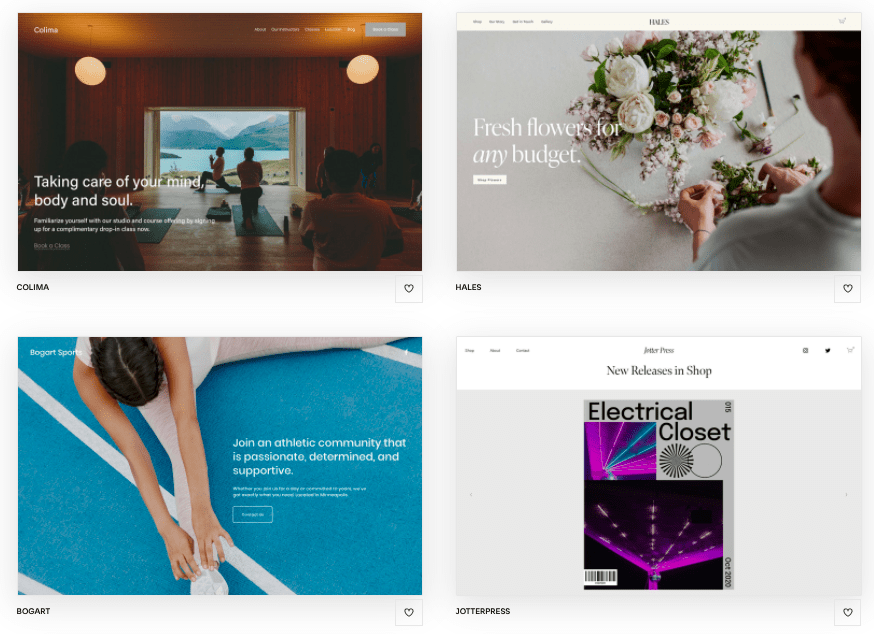
Notable add-on features include Member Areas, a scheduling tool for managing bookings (Squarespace Scheduling), and email marketing. With regard to SEO, Squarespace improved their features not too long ago so that you can now customize all relevant areas (page titles, descriptions, etc.).
And since they cater to a creative audience they have special features such as the podcast player (to host your podcast), the Unfold social media creator app, and the video studio app (a TikTok-style video maker that allows quick and easy production).
Squarespace Pros and Cons
What we like:
- Their brilliant designs that are pretty flexible and offer numerous prebuilt sections for easy use.
- Customer support: next to the great documentation you have access to live chat agents who are available on weekdays, and 24/7 email support.
- It’s the best website builder for blogging: No other site builder offers such sophisticated blogging capabilities, with features including commenting, multiple authors, and even the ability to host podcasts.
- Their mobile app for iOS and Android lets you edit your website and blog on the go.
What they should improve:
- There is no backup and restore feature, which is a bit disappointing.
- It’s not the easiest drag and drop website builder to use; other alternatives are better suited to beginners.
- When we tested their page speed (also an important SEO factor), it wasn’t exactly impressive.
- A larger selection for external applications would be desirable as well (something comparable to Wix App Market).
Other opinions on Squarespace
Sitebuilderreport: 5 / 5
G2: 4.4 / 5
PC Mag: 3.5 / 5
Glassdoor: 3.9 / 5
Why Glassdoor? This rating doesn’t refer to the website builder, but to Squarespace as an employer. Nonetheless, we think how a company is treating their employees is an important factor when choosing a product that you want to use long term.
More information on Squarespace:
Our detailed Squarespace Review gives you an even more complete picture of the website builder.
We have a detailed Squarespace Tutorial if you want to learn how to create a site.
And finally, to start a free trial, head over to Squarespace.com
3. GoDaddy Website Builder
One-stop shop for marketing
We all know GoDaddy web hosting. Turns out, they have their very own website builder – and it’s not half bad. In fact, the GoDaddy website builder is one of the most highly scored on our list, nabbing the #3 spot from our previous bronze medalist, Weebly.
In our experience, it’s tricky to find a website builder that combines ease of use, modern designs, premium features, and affordability. But amazingly, GoDaddy ticks all these boxes – and more.
There’s a reason the website builder is also called ‘GoDaddy Websites + Marketing’, and that’s because it integrates an impressive range of additional marketing tools. A marketing planner, email marketing tool, Canva-like content creator, and social media dashboard are all included. Based on our research we know a handful of website builders that offer something similar (e.g. Wix, Squarespace). However, we think GoDaddy does a much better job of incorporating these tools within its software, and making them very user friendly.
What our readers think of GoDaddy
While the user reviews on our website are less than glowing, you might be relieved to know that they actually relate to previous versions of GoDaddy’s website builder. The current version, introduced in 2019, is a completely revamped website builder that is far more intuitive (and powerful) than its predecessors.
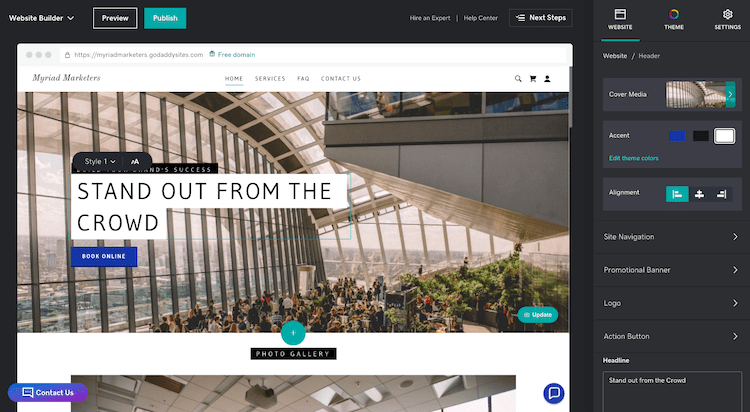
We sincerely hope this version sticks around for longer, and so do our readers, it seems – many said that they appreciated its ease of use, helpful support, and handy integration with GoDaddy’s domain service. But, they also lamented the small selection of templates available, and the limited customization options compared to website builders like Wix.
Who should use GoDaddy?
Given its business-focused features (such as a live chat widget, appointment booker, online store, popups, and marketing tools), we think GoDaddy is one of the best website builders for small businesses and freelancers who need to set up an online presence, quickly.
Its pared-back editor also makes it ideal for beginners who want to create a modern-looking website without too much work. Finally, the affordable plans make GoDaddy a good option for anyone after a basic and budget-friendly website.
Who shouldn’t use GoDaddy?
If you’re after a website builder that gives you full drag-and-drop flexibility and complete design control, you’ll be disappointed with GoDaddy’s simplified editor – it doesn’t give you the kind of free rein that you’d get with website builders like Wix or Webflow.
In our research, we also found the SEO options to be lacking, so it’s not ideal if you need to attract organic traffic to your site.
Similarly, it’s not ideal for those who will be using their website as a blog. The blog editor is basic and offers limited customization options. For serious bloggers, we’d recommend Squarespace or WordPress.
GoDaddy Pricing
Although they don’t widely publicize it, it’s actually possible to create and publish a GoDaddy site for free on their Starter plan. However, features will be restricted, and it won’t be possible to use your own custom domain (or remove the GoDaddy banner ad from your site).
If you’d like to upgrade to one of the paid plans, the good news is that you’ll get a significant discount in the first year. After that, prices are still very affordable on the Basic plan, which costs $11.99 per month if you pay annually.
However, our recommendation would be the Premium plan, which costs $21.99/month and unlocks SEO and appointment booking features.
The GoDaddy website builder plans are:
- Free: $0
- Basic: $11.99/month
- Premium: $21.99/month
- Commerce: $24.99/month
- Commerce Plus: $44.99/month
Noteworthy Features
GoDaddy’s website builder is built for business. Aside from the aforementioned marketing tools, we were also impressed by their online appointment booker, which lets small businesses take appointments for services, classes and events. Incredibly, you can even take appointments on GoDaddy’s free plan, which is something we haven’t really seen with other website builders.
There are also some interesting options for those looking their dip their toes into the world of ecommerce. Their simple-to-use online store builder lets you sell physical and digital products; offer real time shipping rates (within the US); send abandoned cart recovery campaigns; and sync with Amazon, Etsy, eBay, Instagram, Facebook, and more. This is available on the higher-tier ecommerce plans.

You can even take advantage of GoDaddy Payments, their own payment processing system. While it may not be as powerful as the fully-featured Shopify, we think it’s a decent store builder for anyone looking to start up a small online store.
GoDaddy Pros and Cons
What we like:
- Their easy-to-use editor and modern, mobile-friendly templates, which can help you get online quickly
- Excellent marketing features: email marketing, social media dashboard, popups, graphic design tool
- It’s the best website builder for fast page loading speeds: no competitor is as fast
- Appointment booking tool, which lets you offer services, classes and events
- GoDaddy Insights, an AI-powered metrics tool that ties key performance stats together, and gives you personalized Action Plans to increase your website’s visibility
What they should improve:
- SEO options are basic, and severely restricted on lower plans. GoDaddy doesn’t allow for the deep level of optimization offered by other website builders
- The blog editor comes with just a handful of features, and doesn’t give you much control over design or layout
- The lack of an app store means that options to enhance your site’s functionality with third-party tools are limited
Other opinions on GoDaddy Website Builder
Sitebuilderreport: 3 / 5
G2: 3.9 / 5
PCMag: 4 / 5
Glassdoor: 3.9 / 5
Why Glassdoor? This rating doesn’t refer to the website builder, but to GoDaddy as an employer. Nonetheless, we think how a company is treating their employees is an important factor when choosing a product that you want to use long term.
More information on GoDaddy:
Our detailed GoDaddy Review takes a closer look at the pros and cons of this website builder.
If you’d like to try it out for free, head over to GoDaddy.com
4. Hostinger Website Builder (formerly Zyro)
The Affordable Newcomer

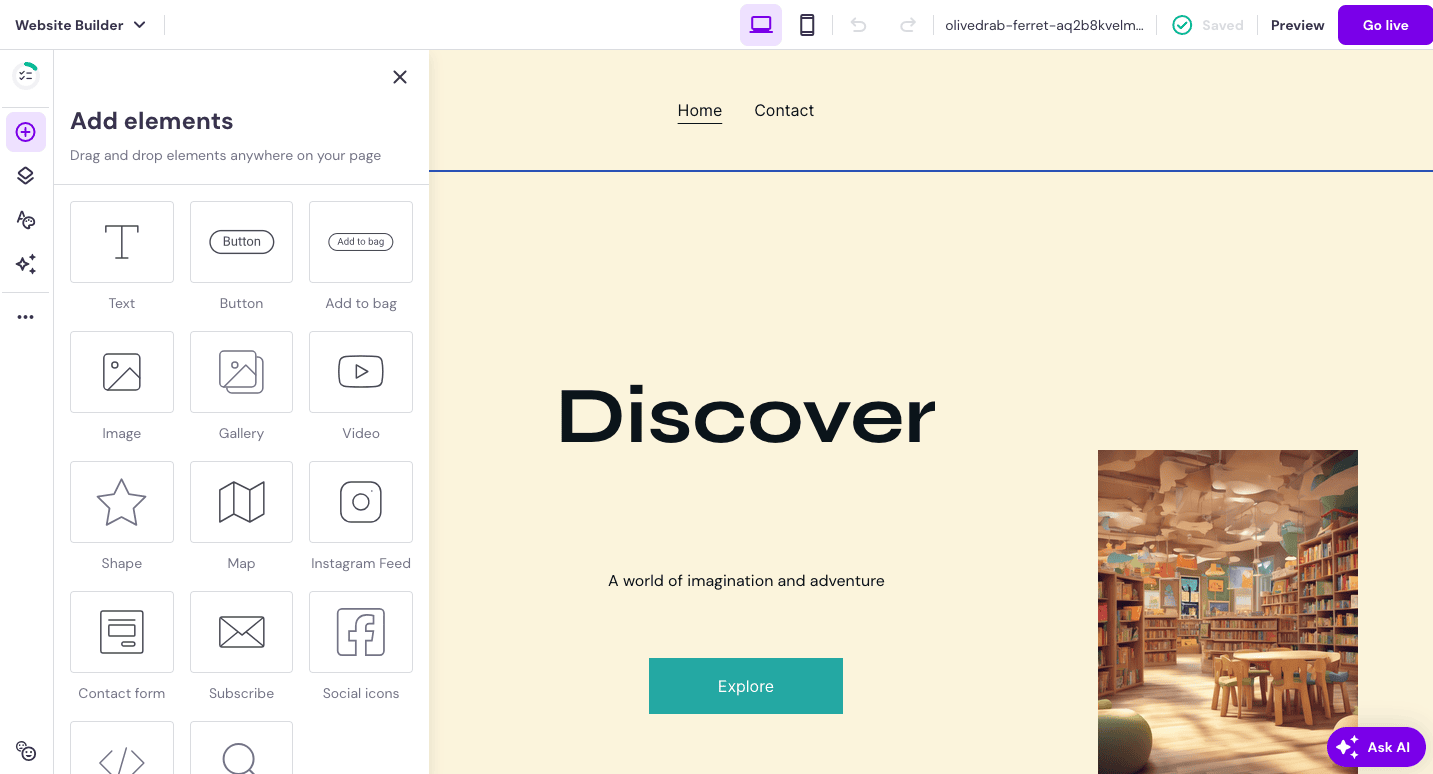
While it may not be as well-known as some of the other website builders on this list, newcomer Hostinger Website Builder (previously called Zyro) is definitely one to watch. Not only does it offer an intuitive and zippy platform for building websites – it also comes at the fraction of the price of most of its competitors.
We’d go so far as to say that it’s the more budget-friendly version of Wix. The drag-and-drop editor is certainly reminiscent of Wix’s visual editor, and its templates are also modern and stylish like Wix’s.
However, it has the upper hand in areas like multilingual sites, which are extremely easy to set up. It also offers an impressive range of AI tools, such as an automated website builder, content writer, image generator, and logo maker, which is a huge bonus for small businesses looking to get their online presence up and running quickly.
As a young company, Hostinger also seem to be receptive to feedback and feature requests – so while it may currently be lagging behind in some functionality (which we go through in detail below), we expect it to catch up in the near future.
Who should use Hostinger Website Builder?
Hostinger Website Builder is the best website builder if you are looking for value. Its price performance ratio is one of the best on the market.
With Hostinger’s focus on building simple, easy-to-launch websites, we see the website builder as being fit for small businesses, freelancers, and individuals who need an online portfolio or resume. If you’re after a small, basic website without all the bells and whistles, Hostinger Website Builder should do the job nicely.
We also found it to offer good value to those looking to build a very small, local online store (less than 500 products). The store manager provides a handful of essential options for managing products, shipping, and payments, making it a simple and intuitive platform for those just getting started in ecommerce.
Who shouldn’t use Hostinger Website Builder?
Many of Hostinger’s features are still in their infancy. For example, the blogging platform lacks integrated commenting capabilities. While it’s probably enough for a small business that uses blogging casually, serious bloggers who rely on blogging for their income would be better off exploring WordPress or Squarespace.
Its limited ecommerce functionality also makes it less than ideal for those looking to open a large online store or sell internationally. While they come with bigger price tags, Shopify and Wix are much more powerful solutions for this purpose.
Hostinger Website Builder Pricing
While Hostinger’s pricing is affordable, the downside is that they don’t offer a free plan like many of their competitors. To start building a site, you need to make a purchase. However, there is a 30-day money-back guarantee, so if you really don’t like it, you can just request your money back.
It offers two simple plans:
- Premium Website Builder for websites and portfolios: $3.19/month (1-year subscription)
- Business Website Builder for online stores: $4.99/month (1-year subscription). It lets you sell up to 500 products (which can be either physical, digital, service, or even donation).
Both plans let you build up to 100 websites and also give you emails, unlimited bandwidth, storage, and 24/7 customer support.
You can choose between monthly, yearly or multi-year subscriptions, with discounts available in the first year.
Also included is a free domain for the first year, if you’re subscribed to the yearly plan or longer.
Noteworthy Features
Hostinger’s suite of AI tools is a novel but useful feature. Aside from the AI builder, which can automatically build you a website based on a series of questions, you also have an arsenal of additional tools, including:
- a website content writer,
- an image generator
- a logo maker
- and a browsing heat map.
While the final product may not be perfect and will still require manual tweaks, it can certainly help to give you a good head start in launching your online presence.
Hostinger Website Builder Pros and Cons
What we like:
- It’s hard to go past Hostinger’s competitive pricing, which makes it an excellent option for budget-conscious users
- Ease of use is on par with the likes of Weebly and Webnode. The templates are easy to edit with the drag and drop editor, which lets you add and move elements effortlessly
- Multilingual websites are easy to set up and SEO-friendly
- Responsive live chat support, plus a comprehensive knowledge base
What they should improve:
- The blogging feature could be dramatically improved with a commenting system and social sharing buttons – functionality that is key to most blogs
- Its integrations with third-party tools are limited, and there is no app store
Other opinions on Hostinger Website Builder
G2: 4.4 / 5
PC Mag: 4 / 5
Trustpilot: 4.6 / 5
Glassdoor: 4.0 / 5 (parent company Hostinger)
Why Glassdoor? This rating doesn’t refer to the website builder, but to Hostinger as an employer. Nonetheless, we think how a company is treating their employees is an important factor when choosing a product that you want to use long term.
More information on Hostinger Website Builder:
See our full review of Hostinger Website Builder here.
Learn more about how Hostinger Website Builder compares to Wix.
To try it out, head over to Hostinger Website Builder
5. Webnode
The Polyglot Website Tool
Although not as popular as other website builders like Weebly or Wix, Webnode still boasts a pretty decent user base—according to its website, it has over 40 million users.
Webnode can be hit-and-miss: some features are advanced and almost unique in the industry. For example, Webnode offers multilingual features for building websites in multiple languages, as well as membership registration features for creating members-only website areas. Based on our research, not many other website builders offer these features out of the box.
On the flipside, Webnode lacks some basic functionality that can make it a no-go for some. In particular, we weren’t too impressed with Webnode’s blogging and online store builder.
That said, Webnode is still a popular free website builder. Most paid plans also come with a free domain and at least one free email account if you’re keen to upgrade to paid.
What our readers think of Webnode
In general, Webnode users praise the website builder’s attractive templates, which help them build professional-looking websites without any technical experience. They love Webnode’s user-friendliness—and in particular, how easy it is to add multiple languages to their website. Users also were pleased by the responsiveness of Webnode’s customer support.
That said, some of our readers ran into trouble customizing their website beyond the built-in features provided. A handful of them have written in seeking technical help with their Webnode website, or even asking for recommendations for expert Webnode designers who can take care of such issues for them.
Who should use the Webnode website builder?
If you want to create a simple and clean-looking website, Webnode might be the right choice for you. It sports over 100 modern templates, categorized by industry to help you find the perfect template for your website.
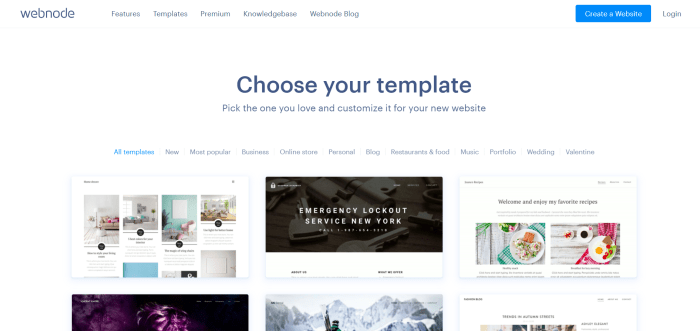
With Webnode, you can also create multilingual or membership websites (or, a multilingual membership website!) without writing a single line of code.
And if convenience is a major consideration for you, you’ll appreciate how Webnode bundles in free email accounts—you won’t have to manage your email separately with another provider. All that at a very low starting price.
Who shouldn’t use Webnode?
Webnode excels at producing a simple-looking website. From our tests, however, we found that Webnode isn’t the best website builder for blogging. Its blog features are quite basic—heading hierarchies are limited to H2 and you can’t assign blog posts to multiple categories. Nor can you add multiple blog contributors. If you are running a blog-focused website, our recommendation would be to check out Squarespace or WordPress.com instead.
Advanced online store owners should look at other ecommerce options. Webnode’s ecommerce features are quite limited, helping you set up products and offer the standard payment methods. But you won’t be able to get real-time shipping rates or set up automatic tax calculations.
Webnode Pricing
Webnode offers a Free plan, which is great for testing the website builder without any financial commitment. However, your website’s domain will be yourwebsitename.webnode.com and Webnode will display a prominent banner ad at the bottom of your website, which is not ideal for professional websites.
If you want to use your own domain, you’d have to upgrade to at least the Limited plan. To enjoy free email accounts, get the Mini plan and up.
That said, our recommendation is to go for at least the Standard plan, which will remove Webnode ads. It also unlocks multilingual, membership registration, and ecommerce features.
The Webnode pricing plans are:
- Free: $0/month
- Limited: $4.00/month
- Mini: $8.50/month
- Standard: $12.90/month
- Profi: $22.90/month
- Business: $31.90/month
See our detailed summary of Webnode’s pricing here.
Noteworthy Features
Webnode’s built-in multilingual support is probably one of its biggest selling points. The website builder makes it easy for users to add new languages to their website with a few clicks. Webnode will duplicate your website content for each language added and store it in separate subdirectories, such as yourwebsite.com/en/.
Separately, Webnode also offers free email accounts. This is handy for creating email accounts to go with your website, which is pretty much a must. From our research, we found that email accounts are a paid add-on for most other website builders.
With Webnode’s membership registration features, you can also block off pages of your website for member-only access.
Webnode Pros and Cons
What we like:
- Its multilingual features for adding multiple languages to your website. Webnode also sets up the necessary subdirectories for you—you won’t have to worry about doing so yourself.
- The ability to backup and restore is available on higher-level plans. You can even download an offline version of your site
- Free email accounts so you don’t need to pay for and manage email accounts elsewhere!
- Membership registration features for creating member-only areas of your website.
- It’s one of the cheapest ways to start a website using a custom domain name
What they should improve:
- Webnode’s ecommerce features are rather limited.
- Likewise for its blog capabilities—it’s not a great option for serious bloggers who run multi-contributor blogs.
- There’s no app store for extending the functionality of your Webnode website with third-party apps.
Other opinions on Webnode
G2: 4.1 / 5
Trustpilot: 2.6 / 5
Glassdoor: 4 / 5
Why Glassdoor? This rating doesn’t refer to the website builder, but to Webnode as an employer. Nonetheless, we think how a company is treating their employees is an important factor when choosing a product that you want to use long term.
More information on Webnode:
Check out our detailed Webnode review for more information.
Compare Webnode’s plans in this detailed pricing guide.
To start a free website, go to Webnode.com
6. Jimdo
Solid All-Round Package for Beginners
 We awarded Jimdo our Best Website Builder For Ease of Use badge for 2023!
Founded in 2007, Jimdo is a German website builder with more than 32 million websites to its name. Simplicity is also its credo, which shows in the AI set-up wizard that Jimdo internally calls “Dolphin”. Answer a short series of questions and Jimdo will automatically generate a working website for you. The website builder can even pull information from your Google and Instagram listings for inclusion in your website.
Apart from being a solid website creation suite, Jimdo also provides basic online store features for selling physical products. And if you’re more code-savvy, you can use Jimdo’s classic Creator editor to insert custom lines of code as you build your website.
What our readers think of Jimdo
In general, Jimdo users appreciate how the website builder helps them start a simple website without too much difficulty. However, they also agree that Jimdo tends to lack the customization options and features they need to build more full-featured websites. They do like Jimdo’s customer support though, praising its ease of access and responsiveness.
Who should use Jimdo?
Jimdo is a noteworthy option for absolute beginners who aren’t confident of building a website themselves but don’t have the budget to outsource the work. The website builder’s AI-powered Dolphin builder takes just a few minutes to create and tailor a simple website to meet your needs. From there, you can add content blocks and customize placeholder text to flesh out your website. All things considered, Jimdo is the best website builder on the market for ease of use.
Simplicity is Jimdo’s strong suit, making it a good choice for personal projects and small business uses. For example, we’d recommend using Jimdo if you want to build a one-page portfolio or a simple website that tells customers how to visit your physical store.
You’ll also find Jimdo particularly useful if you have already set up online profiles (e.g. Google My Business, Facebook, Instagram) for your business. That’s because Jimdo can automatically populate your website with data from these profiles.
Who shouldn’t use Jimdo?
Bigger businesses with more advanced website needs will be better off using a website builder that offers more features. For example, Jimdo doesn’t support blog creation, but Squarespace and WordPress do.
Meanwhile, if you need digital product fulfillment, automatic tax calculation, or other advanced ecommerce features for your online store, we find Shopify and Wix to be far superior options.
Jimdo also isn’t a good fit if you want to set up a membership website. The website builder doesn’t have features for letting users create member accounts. If member registration is important to you, check out other simple website builders like Wix or Webnode.
And if you want search engines to find your website easily, you’ll be disappointed by Jimdo’s limited range of search engine optimization (SEO) features. Our research shows that many other website builders—such as Wix and Squarespace for example—give you more control when it comes to SEO.
Jimdo Pricing
There are two categories of Jimdo Dolphin pricing plans to choose from: Non-Ecommerce websites and Online Shop. Of the two, only the Non-Ecommerce website pricing category offers a free plan. This plan is called Play and lets you build a basic website on a jimdosite.com subdomain. A small Jimdo ad will also be displayed on your website, among other limitations such as the 5-page limit.
To overcome these, we suggest that you go for the Start plan, which is the most basic of Jimdo’s paid plans. And if you need ecommerce features, you’ll want to go for at least the Basic plan under Jimdo’s pricing category for online shops.
The Jimdo Dolphin pricing plans for non-ecommerce websites are:
- Play: $0/month
- Start: $9/month
- Grow: $15/month
- Unlimited: $39/month
Meanwhile, the Jimdo Dolphin pricing plans for online shops are:
- Basic: $15/month
- Business: $19/month
- VIP: $39/month
For more information, visit our guide to Jimdo Dolphin pricing. You can also learn about the separate pricing plans for Jimdo Creator here.
Noteworthy Features
Jimdo’s Dolphin AI set-up wizard is fantastic. It asks some questions to learn about your website project, then uses your responses to whip up a basic website. You can have your website set up in about three minutes—we know, because we timed it!
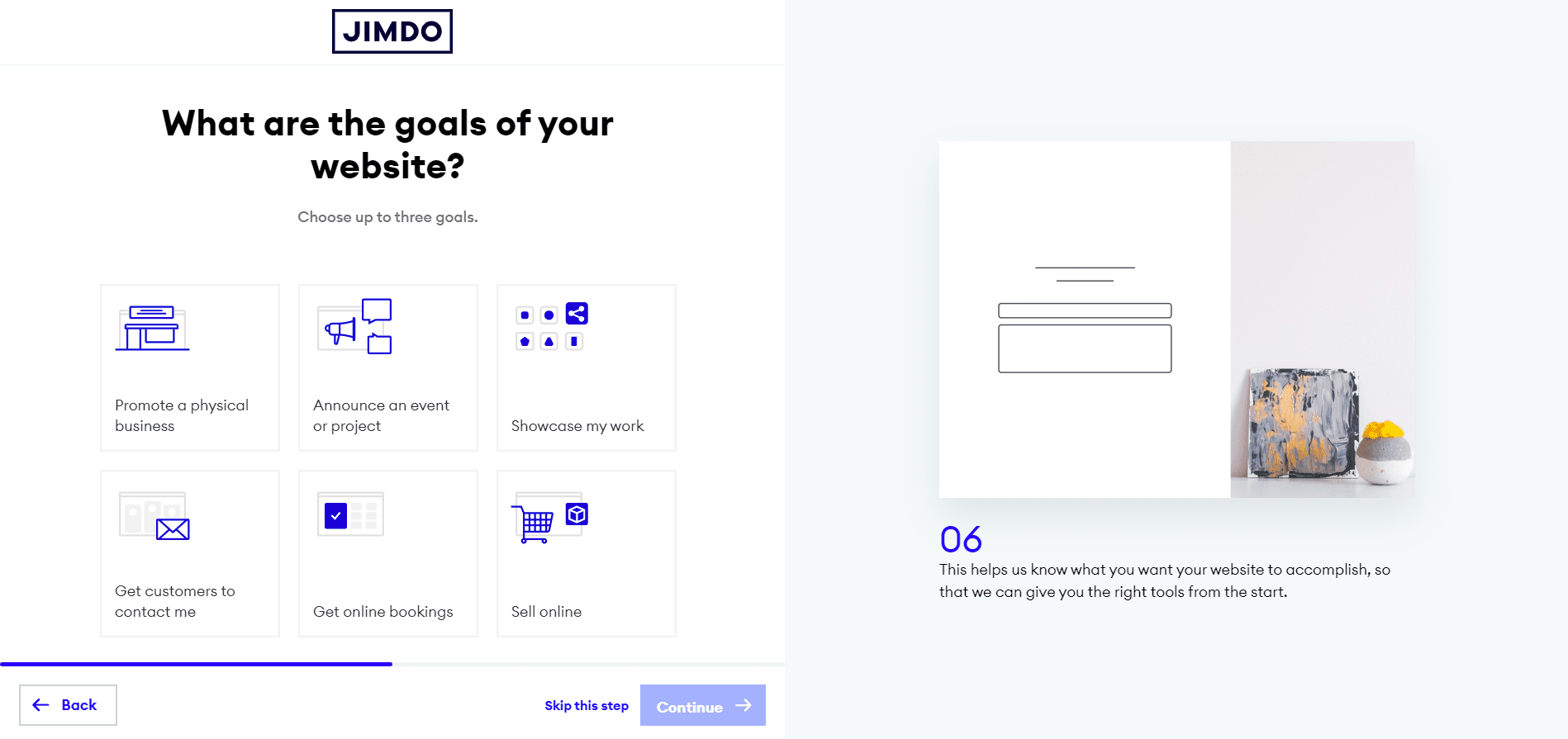
The Business Listings feature is also worthy of a mention. It provides a one-stop platform for you to update your business’ information, which can then be synced to Facebook, Google, and other listing platforms simultaneously. Talk about convenience!
Jimdo has a built-in statistics feature for tracking your website’s performance. However, data junkies will probably love its Google Analytics integration. Tap on it to connect your Jimdo website to Google Analytics and get even more advanced data and reports.
Jimdo Pros and Cons
What we like:
- With the AI-powered Jimdo Dolphin builder, you can quickly set up a basic website without writing any code.
- Business Listings provides a convenient option for keeping your business information up to date on multiple listing platforms.
- Unlike some other website builders we’ve tested, Jimdo doesn’t charge transaction fees for ecommerce orders.
- If you don’t have a website logo, you can use Jimdo’s free logo creator to generate one for free.
- Jimdo websites generally have fast page load speeds, which is great for both SEO and the user experience!
What they should improve:
- You can’t set up a blog for Jimdo Dolphin websites (blogs are possible with Jimdo Creator websites, though).
- Jimdo’s ecommerce features are quite basic—you can’t sell digital products or get real-time shipping rates for example.
- We’d also like to see Jimdo expand its limited range of SEO features.
Other opinions on Jimdo
G2: 4 / 5
PC Mag: 3 / 5
Trustpilot: 4.1 / 5
Glassdoor: 2.5 / 5
Why Glassdoor? This rating doesn’t refer to the website builder, but to Jimdo as an employer. Nonetheless, we think how a company is treating their employees is an important factor when choosing a product that you want to use long term.
More information on Jimdo:
Learn more about Jimdo in our detailed Jimdo review.
Explore Jimdo’s prices in our Jimdo Dolphin pricing and Jimdo Creator pricing guides.
You can also try Jimdo for free here.
7. IONOS – MyWebsite
Websites for businesses
IONOS is another domain and hosting giant that has ventured into the world of DIY website building. But unlike GoDaddy, 1&1 IONOS’s business-focused website builder offers several options, to cater to different levels of technical experience.
For complete beginners, there’s IONOS MyWebsite Now, which offers a variety of templates and a simplified editor. Most businesses, however, opt for MyWebsite Creator, which offers hundreds of industry-specific templates that can be edited via an intuitive drag-and-drop builder. (This is actually powered by Duda’s site creator – a bonus for those who are already familiar with that tool.) There’s also MyWebsite Creator Pro, for those who want to take customization even further.
So, what sets the IONOS website builder apart? Unique marketing features such as personalization, which lets you tailor content to specific visitors, definitely give it a one-up over competitors. In our experience, it also handles multilingual sites and translations more smoothly than most website builders (many of which don’t offer this feature at all).
All of this is offered at a very attractive price, with MyWebsite Creator plans starting at $10/month.
What our readers think of IONOS
Users give IONOS MyWebsite a thumbs up for user-friendliness, appreciating the speed and ease with which they can get a professional website up and running. They also liked the selection of templates on offer, and the support, which is available through various channels.
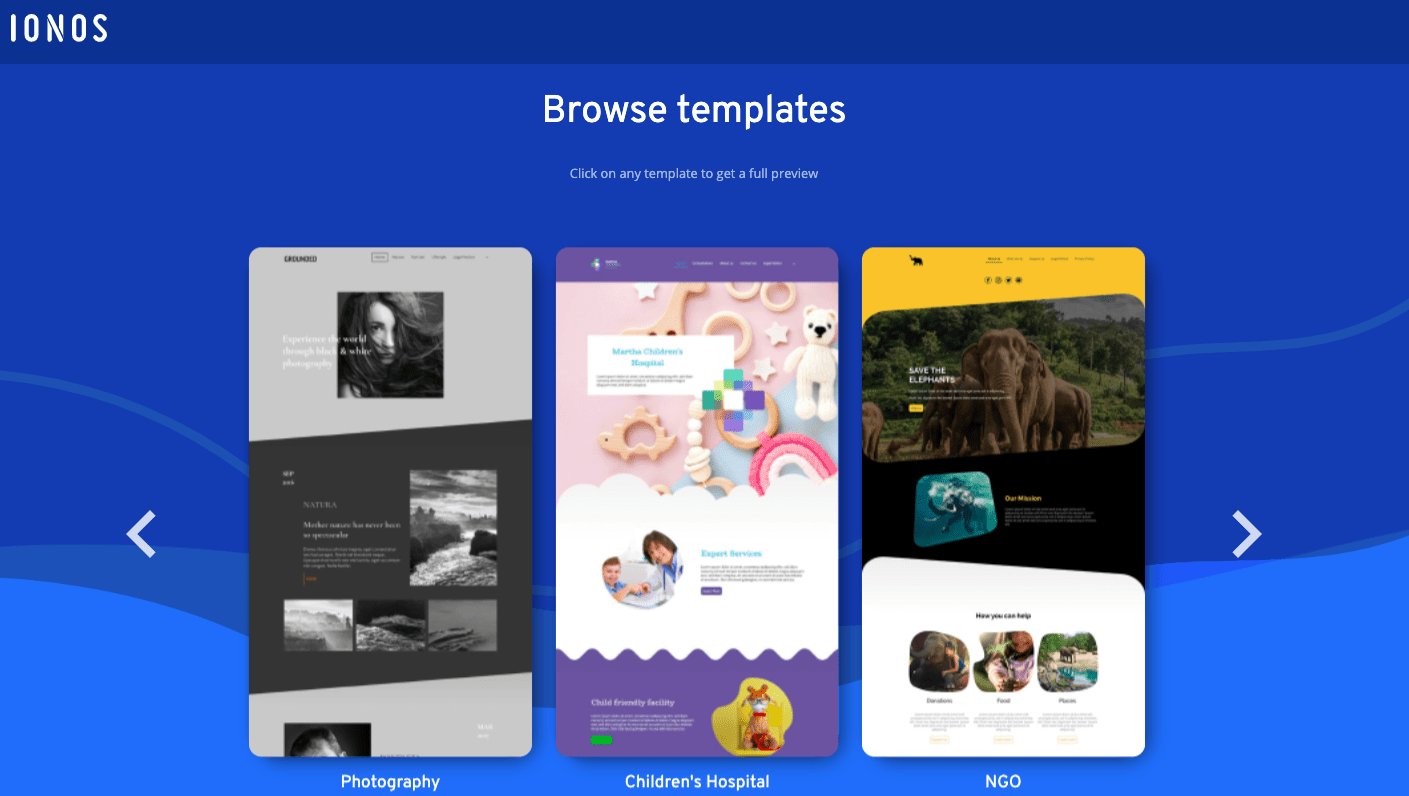
A standout point is the pricing – many noted that it was one of the biggest draws of the IONOS website builder.
However, the support can be a bit commercial sometimes, trying to sell you extra features or tools for your website (it seems to be dependent on the support agent) which could be annoying for some users. Many also said they would have liked more flexibility with editing the website designs – something more along the lines of what Wix offers.
Who should use IONOS?
While most website builders offer features tailored to small business, IONOS stands out for offering personalization and multilingual features. With the ability to add an online store (via Ecwid), blog, integrated newsletter tool, booking forms, and a calendar, IONOS caters to a wide range of online business needs.
IONOS’s prices are also a lot lower than the competition’s, something that price-conscious users will undoubtedly find interesting.
Who shouldn’t use IONOS?
We’ve found that options to enhance IONOS websites with third-party apps are limited, with just a handful of direct integrations available with tools like Livechat, Disqus, Yelp, and Google Translate. Those looking to easily add a greater range of functionality to their site will find better options with Wix.
Unfortunately, it’s not possible to use a domain name purchased with another provider, unless you transfer it to IONOS. So if you already have a domain name and aren’t keen on moving it over, IONOS isn’t a very practical option.
IONOS Pricing
While IONOS’s My Website packages are very attractive, one issue is the lack of a free plan – or, even trial. This makes testing out the platform difficult, although there is a 30-day money-back guarantee available if you want to cancel during this period.
If you decide to stick to it, the good news is that you’ll be nicely rewarded with generous discounts in the first 6-12 months.
A free domain in the first year, plus a professional email address, are also included in all plans.
The IONOS MyWebsite plans are:
- Starter (MyWebsite Now): $5/month
- Starter (MyWebsite Now + store): $12/month
- Plus (MyWebsite Creator): $10/month
- Plus (MyWebsite Creator Pro + store): $20/month
- Pro (MyWebsite Creator Pro): $15/month
- Pro (MyWebsite Creator Pro + store): $35/month
Noteworthy Features
IONOS MyWebsite offers some interesting business features that we haven’t really seen in any other tool. Its business card feature lets you display your business’s contact details, as well as a map and contact form, while you’re working on your ‘real’ site in the background.
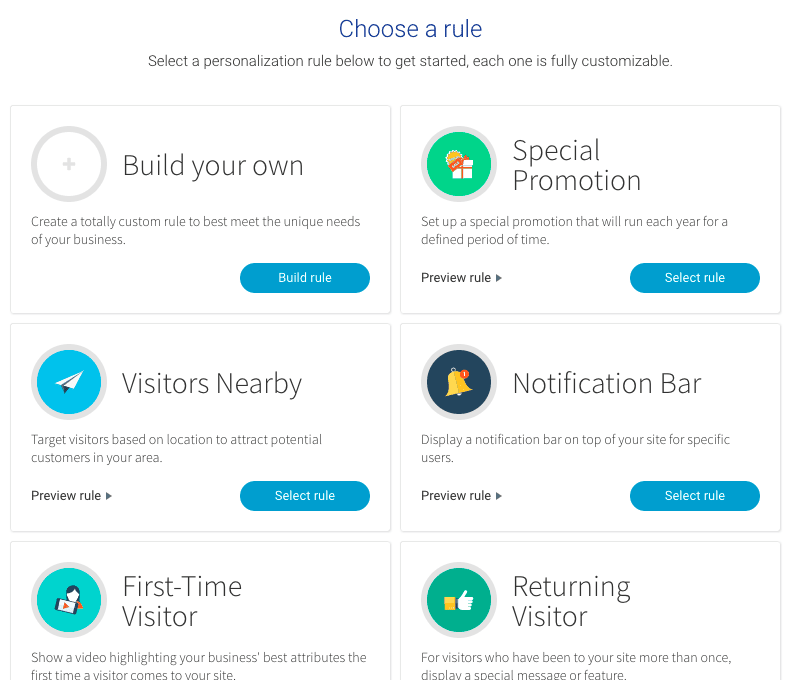
There’s also the personalization feature, which lets you display custom content to specific users, for example, a notification bar offering discounts to returning visitors.
Multilingual sites are also a strength of IONOS MyWebsite. With over 60 languages available, which can be added and deactivated at any time, you can easily add your own translations and reach a wider international audience. There’s also the option of using automatic translations from Google Translate.
IONOS Pros and Cons
What we like:
- Excellent business features, such as email newsletters, personalized content, and SEO tools, to help small businesses gain customers online.
- Advanced multilingual capabilities, letting you add both manual and automatic translations.
- Affordable pricing, with significant discounts offered in the first year.
- Email, live chat and phone support is offered, as well as a single point of contact.
- Backups of your site are made every time you publish, and it takes just one click to restore a previous version of your site.
What they should improve:
- The lack of a free plan/trial is a huge inconvenience. It’s not possible to try the platform out without handing over any payment details.
- A more extensive app store/widget library would help make integration with third-party tools easier.
Other opinions on IONOS Website Builder
G2: 4 / 5
Trustpilot: 4.1 / 5
Glassdoor: 3.5 / 5
Why Glassdoor? This rating doesn’t refer to the website builder, but to IONOS as an employer. Nonetheless, we think how a company is treating their employees is an important factor when choosing a product that you want to use long term.
More information on IONOS:
You can learn more about IONOS MyWebsite in our full review.
If you’d like to try it out, visit IONOS.com.
8. Weebly
Unmatched Ease-of-Use

Weebly used to be one of our favorite website builders. The ease of use of their website editor was (and still is) unmatched.
But Weebly seems to have fallen by the wayside after being acquired by Square. These days, the Square team appears to be prioritizing the development of its Square Online e-commerce platform. As a result, not many features have been added to Weebly in recent years.
That said, the features we love about Weebly are still there—their blog and membership area being two good examples. And from our experience, it isn’t common for website builders to make e-commerce features available for free like Weebly does. All these make Weebly still worth using if you want to build a website with a decent range of features, and without going through too much hassle.
What our readers think of Weebly
It isn’t just us who say Weebly is user friendly: so do many Weebly users! They wax lyrical about how the website builder is easy to understand. In fact, some users reported being able to start, and publish, a beautiful Weebly website in one day without having any web design experience.
However, readers also expressed concern with Weebly’s apparent stagnation ever since it was bought over. Because of this, some of them are looking to switch website builders, such as to Square Online (which seems to be Square’s goal).
Who should use Weebly?
If you’re completely new to building a website, Weebly is a decent choice for its ease of use. In particular, you’ll love Weebly if you’re starting a blog—adding new posts, crafting their content, and publishing them on your Weebly website is a breeze.
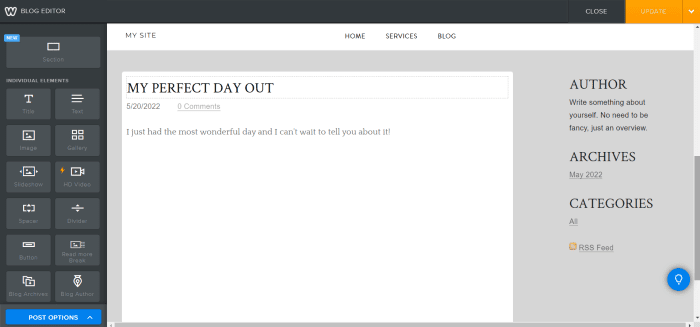
Will you be using your website to grow your email list? Weebly can help with that too. Use its built-in email marketing features to create email forms and send marketing emails to your subscribers. (Additional charges may apply, though.)
Finally, check out Weebly if you’ll be building a membership website. It’s got the features you’ll need for membership registration and making certain parts of your website off-limits to non-members.
Who shouldn’t use Weebly?
Given Weebly’s slower development pace in recent years, it may not be the best if you want a website builder that looks more modern and is more frequently updated. After researching many website builders, we find Wix and GoDaddy to be much better options in this regard.
On a related note, Weebly might not be a great choice if you care about making a good first impression with your website. That’s because many of Weebly’s templates look rather dated. Using them can cause visitors to think that your website had been built a long time ago (and not updated to keep in touch with the latest web design trends).
People who want to build international websites should probably also give Weebly a miss. That’s because Weebly doesn’t have native features for adding multiple languages to a website. While you could get around this by installing a third-party multilingual app, here’s one obstacle you won’t be able to overcome: Weebly’s blocking of traffic from some countries. Would we want to lose access to these countries’ visitors? No, thank you.
Weebly Pricing
Weebly has a Free plan and it’s a pretty generous one. It includes most of the website builder’s main features, including e-commerce. However, your website will have a Weebly-branded domain and display Weebly ads, which may not be the most professional-looking.
If you’d like to connect your own domain, the Personal plan is what you need. But to get the most out of Weebly, sign up for at least the Professional plan. This plan not only removes Weebly ads, but also grants access to advanced website stats, password protection, and other useful features.
The Weebly pricing plans are:
- Free: $0
- Personal: $6/month
- Professional: $12/month
- Performance: $26/month
For more information, check out our guide to Weebly pricing.
Noteworthy Features
Weebly features a neat blogging system that’s easy to add to your site. With Weebly’s flagship drag-and-drop website builder, you can publish some pretty sophisticated-looking blog posts complete with image galleries, slideshows, products, commenting and more.
From our tests, we also find Weebly’s membership website features to be worthy of mention. We like how you can not only require member registration for certain website sections, but also specify which individual members (or groups of them) should be allowed access!
And here’s another cool feature: a mobile app for editing your Weebly website on the go. From the app, you can also keep a close eye on your website stats even if you aren’t at your computer. The Weebly app is available for both iOS and Android devices.
Weebly Pros and Cons
What we like:
- Weebly’s ease of use, no doubt. Drag and drop various content elements into your website and you’ll have a professional-looking website in no time.
- Building multi-level navigation menus is a piece of cake—again, just drag and drop your menu pages to set their hierarchies however you want!
- The website builder lets you set up membership registration without too much difficulty.
- The Weebly App Center provides a wide range of third-party apps for adding more features to your website.
What they should improve:
- Weebly could definitely work on more regular product improvements and revamping its interface—the website builder looks outdated in its current form.
- Similarly, Weebly should add more modern-looking templates to its collection.
- We’d love to see Weebly add automatic backup functionality. Currently, you have to take manual backups of your website. And even then, your blog and store pages won’t be included in the backup.
Other opinions on Weebly
Sitebuilderreport: 3 / 5
G2: 4.2 / 5
PC Mag: 3.5 / 5
Glassdoor: 4.1 / 5
Why Glassdoor? This rating doesn’t refer to the website builder, but to Weebly as an employer. Nonetheless, we think how a company is treating their employees is an important factor when choosing a product that you want to use long term.
More information on Weebly:
Visit our detailed Weebly review for more information.
Learn more about Weebly’s plans in our comprehensive pricing guide.
You can also start your free Weebly website here.
9. Webflow
Creating Websites for Clients Easily

Webflow is not your typical drag-and-drop website builder. Headquartered in San Francisco and backed up by some major funding, Webflow offers a platform that combines powerful CMS capabilities with an intuitive visual editor. It’s fast becoming the platform of choice for designers, freelancers, and agencies.
With Webflow, designers have complete control to build responsive websites, without the need for any coding. They can also take advantage of Webflow’s CMS collection features to re-use elements and create blog and product page templates, helping to ensure design consistency (while also saving a lot of time and effort).
Because of this, Webflow is often compared to WordPress – with the added benefit of being more intuitive to use. In our research, we also found the editor to be similar to those offered by designer favorites Sketch and Figma, helping to make the learning curve for those familiar with these tools a lot easier.
What our readers think of Webflow
Most readers who have used Webflow agree that it’s a powerful tool, giving designers more freedom than traditional website builders. Although they acknowledged that it required more time to get used to, they appreciated the wide range of online resources available in the Webflow University.
However, many agreed that pricing could be clearer – something that Webflow has taken recent steps to try to rectify with the introduction of its Workspace plans.
Finally, some also commented that the personal support could be improved – particularly the process of submitting support tickets, and Webflow’s response times.
Who should use Webflow?
Webflow is targeted at designers, developers, freelancers, and agencies, who want more design control than website builders like Wix and Squarespace can offer. These are users who are more likely to prefer Webflow’s all-in-one solution to WordPress, as they don’t have to deal with having to find a hosting provider, or take care of security and updates. They can also start with a blank canvas, meaning they have full control over the website’s design.
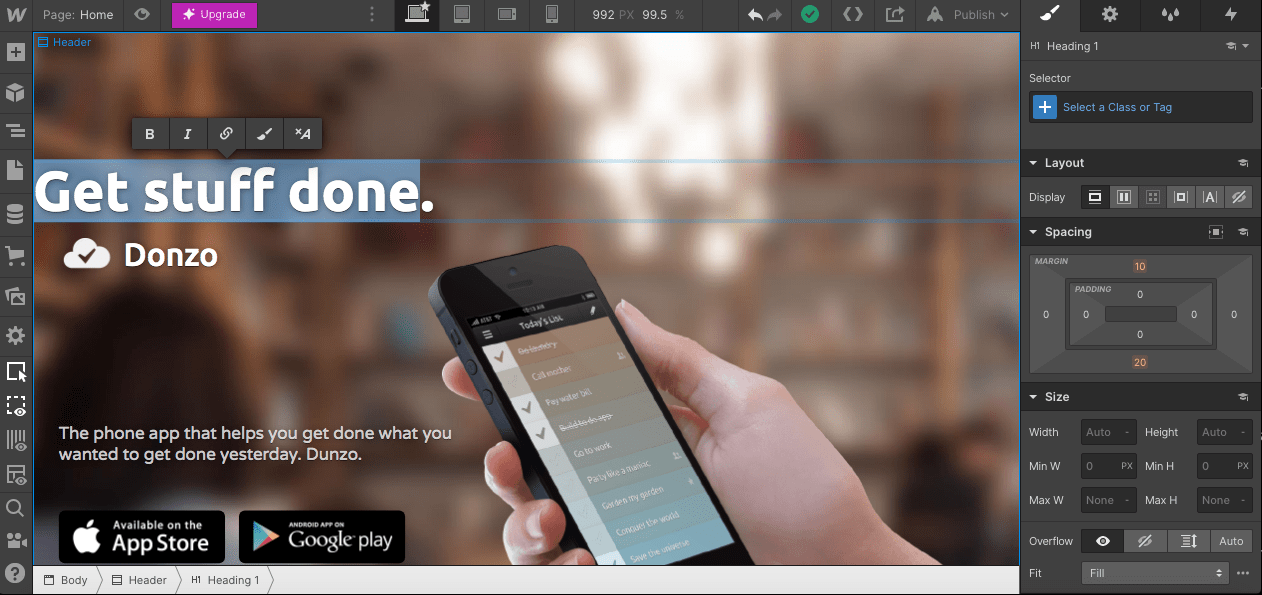
Webflow’s no-code platform means sites built with the platform can generally launch quicker than with CMSs like WordPress. At the same time, having some coding knowledge will give you a big advantage, as you have access to the code in case you need to make further customizations. So, it’s ideal for more technical users.
If you need to build multiple sites (for example, for clients), or collaborate with other team members, then Webflow’s Workspace plans offer account management, team management, and staging features.
In general, we see Webflow as being better built for business sites, blogs, personal sites and portfolios – especially those that will benefit from its CMS collection features.
Who shouldn’t use Webflow?
If you need a quick and easy way to launch a simple website, Webflow probably isn’t it. The editor is more complex than others we’ve tried, and there is a steep learning curve involved.
Similarly, there are only a handful of free templates available (and the designs aren’t amazing), so unless you’re prepared to fork out the money to purchase one (or put together your own design from scratch), we think options like Wix and Squarespace make more sense for those seeking a convenient solution.
Online store owners who need advanced ecommerce features, such as gift cards, multicurrency stores, offline payments, and the ability to sell subscriptions, may also find Webflow lacking. Shopify and Wix offer more of these options.
Webflow Pricing
While Webflow’s pricing can be a bit of a minefield, one thing helps to make it clearer: a free plan (Starter) that lets you test out its features, and even publish a website on Webflow’s own domain. Note that this is for very small sites only, as you can only publish 2 pages, and traffic is capped at 1,000 visitors/month.
Then, for those who need to publish an individual website only, there are Site plans. Starting at $12/month, these allow you to use your own domain and host your site with Webflow. There are four paid Site plans to choose from, and the more you pay, the more features you unlock.
If you plan to build multiple sites, Webflow’s Workspace plans let you create unhosted sites, as well as giving you team management and code export features. Higher plans increase the number of sites you can build. To publish websites, you can either host your exported code elsewhere, or purchase a Site plan.
Webflow’s Site plans are as follows:
- Starter: $0
- Basic: $12/month
- CMS: $23/month
- Business: $39/month
Webflow’s Workspace plans are:
- Starter: $0
- Core: $19/month
- Growth: $49/month
Prices shown are for yearly plans, although you can also purchase monthly subscriptions. Enterprise pricing is also available for larger businesses.
Noteworthy Features
Webflow combines the best features of website builders and content management systems. With its drag-and-drop editor (which we found to be fast compared to many other more laggy editors), you have complete control to design a website within its visual editor, while also being able to customize it for different screen sizes. At the same time, you can also use its powerful CMS features to build out collection-based pages and templates.
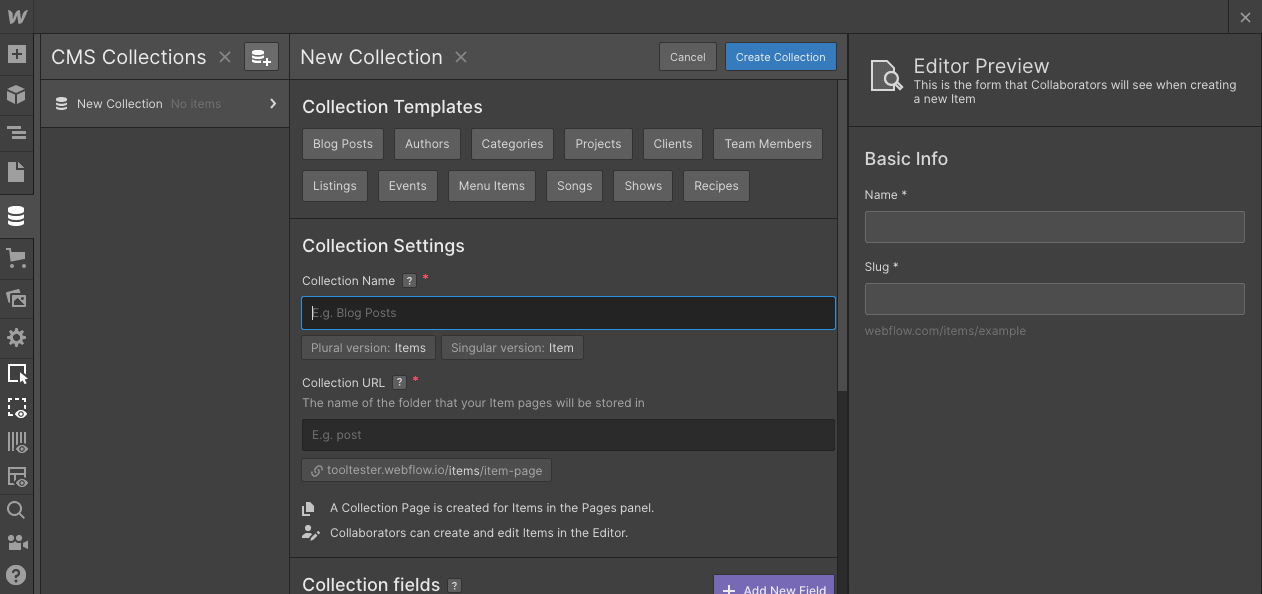
Designers may be surprised (and pleased) about the fact that you can import Lottie Animation files, adding an extra layer of interactivity to webpages in a very simple, low-resource way.
Finally, developers will appreciate the ability to export clean HTML, CSS, and JavaScript files from Webflow, and host them elsewhere. We’ve found that this level of freedom isn’t so readily available in other website builders, although we should mention that not all content can be exported from Webflow.
Webflow Pros and Cons
What we like:
- Webflow gives you an incredible amount of freedom over your website design. Layouts, styles, interactions, and designs for different screen sizes are all within your control.
- The ability to export your code means you’re never locked in and have the freedom to host your site elsewhere, if you choose.
- Webflow’s Workspace plans are built for client work, enabling you to build multiple websites and collaborate with team members.
- If you don’t mind rolling up your sleeves, you’ll find Webflow’s online resources to be very comprehensive and useful. A helpful guided tour is also available when you first enter the editor.
What they should improve:
- If you plan to use a template rather than create your own design, note that most of the templates in Webflow’s library are paid. There are just a handful of free ones, and we didn’t find the designs to be very interesting.
- The pricing can be quite confusing, with different plan types and levels. We recommend doing your research to find the right Webflow plan (our Webflow pricing guide can help).
- Webflow’s ecommerce features aren’t the strongest. We were surprised by the lack of important features such as gift cards, and the ability to sell subscriptions
Other opinions on Webflow
Sitebuilderreport: 4 / 5
G2: 4.4 / 5
Glassdoor: 4.5 / 5
Why Glassdoor? This rating doesn’t refer to the website builder, but to Webflow as an employer. Nonetheless, we think how a company is treating their employees is an important factor when choosing a product that you want to use long term.
More information on Webflow:
Learn more about Webflow’s pros and cons in our detailed Webflow review.
To start building a website for free, visit Webflow.com
10. WordPress.com
WordPress for starters
The software WordPress, which was first designed to create blogs, now powers 42.9% of all websites on the Internet. It is extremely powerful, customizable, and flexible. You can create any kind of website with it, from ecommerce to a real estate portal or a full online newspaper.
While the software itself is free and open-source, there is a version that is more like other website builders on this page. It’s found through WordPress.com, and unlike the bare-bones version of WordPress offered via WordPress.org, it comes with web hosting, pre-installed plugins, a selection of themes, and dedicated support.
This is all great because it takes care of all the things you usually have to do yourself. That makes it one of the easiest ways of creating a WordPress website – so let’s check out its pros and cons.
What our readers think of WordPress.com
Based on readers’ feedback, users seem to love the convenience provided by WordPress.com. Many had previously hosted their WordPress sites with other companies, but ran into problems with support, maintenance, or security. They moved their sites to WordPress.com because they appreciated the expert support provided, and the fact that updates were all taken care of by WordPress themselves.
However, WordPress.com recently went through several rounds of pricing changes, causing a lot of confusion (and frustration) among readers. Let’s see if their latest pricing will stick.
Who should use WordPress.com?
WordPress is the world’s most popular CMS, in large part due to its flexibility, wide range of plugins, and unparalleled blogging features. But, many potential users are put off by the considerable work that needs to go into managing hosting, security, and updates – not to mention the lack of customer support available.
In our view, WordPress.com solves that problem. As hosting, security and maintenance are all taken care of for you, you can fully focus on building your site and reaching your audience. Should anything go wrong, there will always be someone that you can get in touch with to help.
With that in mind, we’d recommend WordPress.com for bloggers, freelancers, creatives, and businesses – anyone who will be updating their site on a regular basis, and need more flexibility and bandwidth than a website builder (like the others on this list) can provide.
Having a bit of technical know-how (e.g. HTML knowledge) would also be helpful, although it’s not strictly necessary.
Who shouldn’t use WordPress.com?
Absolute beginners may struggle to get used to WordPress’s complicated backend. The visual editor is also less intuitive than Wix and Squarespace’s, and is not as flexible as we’d like it to be.
Generally speaking, WordPress.com wouldn’t be our first choice for those who are only after a simple, easy-to-manage website.
At the same time, we wouldn’t recommend it to very advanced users either. If that’s you, you’d probably save a lot of money by managing your own WordPress.org installation and picking your own hosting provider.
WordPress.com Pricing
As we mentioned previously, WordPress.com have gone through several rounds of pricing changes in a very short period of time. Here’s the latest pricing:
- Free: $0
- Premium: $8
- Business: $25
- eCommerce: $45
Find all the details of WordPress.com’s pricing in this analysis.
Noteworthy Features
The biggest advantage of WordPress.com is, without a doubt, its plugins. With around 60,000 plugins available, there’s no other website builder or CMS that even comes close to offering the enhanced functionality that a WordPress site can.
Whether you need to amp up your SEO, sell online, add translations, or integrate your email marketing software, you’ll have a high chance of finding the right plugin for your needs. (Note that you’ll need one of WordPress.com’s higher-tier plans to be able to access plugins.)
And of course, we have to mention WordPress’s blogging features, which are a big reason why WordPress is so popular with bloggers. With the ability to design blog pages, add media, and enable plugins for managing comments and detecting spam, WordPress offers more blogging flexibility than any other tool we’ve tried.
WordPress.com Pros and Cons
What we like
- Hundreds of themes are available on WordPress.com, many of which are free. Premium themes are also available to purchase on higher-level plans, and it’s possible to make CSS edits too.
- WordPress is one of the industry leaders in search engine optimization, and its in-built SEO tools let you perform the most important tasks. For more advanced tasks, you can install Yoast SEO or other plugins
- WordPress.com lets you manage all aspects of your website – content, hosting, domain, and security, all in one place. It’s convenient and can save you a lot of time and effort
- Users often lament the lack of personal support available for WordPress.org sites. However, with a WordPress.com account, you’ll get unlimited email support, plus live chat support on higher-level annual plans.
What they should improve
- The constant changes to the pricing are hard to keep up with. It’s also a shame that lower-level plans don’t include plugins, site backups, premium theme access, or live chat support. While it may offer convenience, it’s not the most economical option if you’re after a WordPress site
- The Ecommerce plan is very pricey at $45/month – other ecommerce builders like Shopify and Wix offer more affordable options
- While they have done a lot of work to make the editing experience more visual, we still find WordPress’s visual editor to be less flexible and intuitive than other website builders (such as Wix and Squarespace)
Other opinions on WordPress.com
G2: 4.4 / 5
PC Mag: 3 / 5
Trustpilot: 2.2 / 5
Glassdoor: 4.4 / 5 (refers to parent company Automattic)
Why Glassdoor? This rating doesn’t refer to the website builder, but to Webflow as an employer. Nonetheless, we think how a company is treating their employees is an important factor when choosing a product that you want to use long term.
More information on WordPress.com:
Find out more about WordPress.com in our review.
Learn about the differences between WordPress.com and WordPress.org in our full comparison.
To start building a WordPress.com website for free, visit the site.
11. Strikingly
Great for Onepagers
Strikingly has its focus on one-page layouts, making it one of the best website builders for landing pages. This can be especially interesting if you want to create a landing page, say for event registrations. Their responsive designs are indeed striking (no pun intended) and look great on mobile devices. You can either start with their ad-sponsored free plan or upgrade to the Limited ($8), Pro ($16) or VIP plan ($49 per month). Limited also includes a 1-product online store, whereas Pro lets you sell up to 300 different items.
Strikingly Pros and Cons
What we like:
- If you are planning to build multiple sites, the PRO plan can be interesting as it includes up to 3 sites. We found their support to be top-notch and it’s pretty easy to get your head around Strikingly.
What they should improve:
- Single-page websites are not Google’s favorite so it might not be too easy to rank well. Something simple like adding an external code snippet requires you to upgrade to the PRO plan, which is comparatively expensive (unless you will actually create the full three websites that are included).
Free trial: www.strikingly.com
12. Duda
The Language Genius
Duda’s website builder started out in 2008 and is special in many ways. For once, they get all the basics right: the templates look great, you get all the SEO settings you need, the blog is decent and there is an online store.
On top of that, there are two areas where they manage to outshine their competitors: for once, you can create multilingual websites with it (an area that barely any site builders masters). Plus, they also offer what they call “website personalization tools”. Using them you can show fully customized content to your visitors, for example, based on their location or the time of the day. A very powerful feature!
All this comes at a price: Duda is not exactly cheap. The lowest plan (Basic starts at $19 per month and doesn’t include a domain name or email accounts. An interesting thing to note is that Duda sells their website builder to other web hosting companies, such as IONOS (where it’s called MyWebsite Creator). There, you can get pretty much the same product at a much lower price.
Duda Pros and Cons
What we like:
- Ease of use, their stylish templates, and their unique site personalization tools. Also, in our eyes, Duda is second to none for multilingual websites.
What they should improve:
- Although there is an app store with third-party applications, the available apps are relatively limited. Prices are quite steep compared to the competition.
Free trial: duda.com
13. One.com
The Budget Site Builder
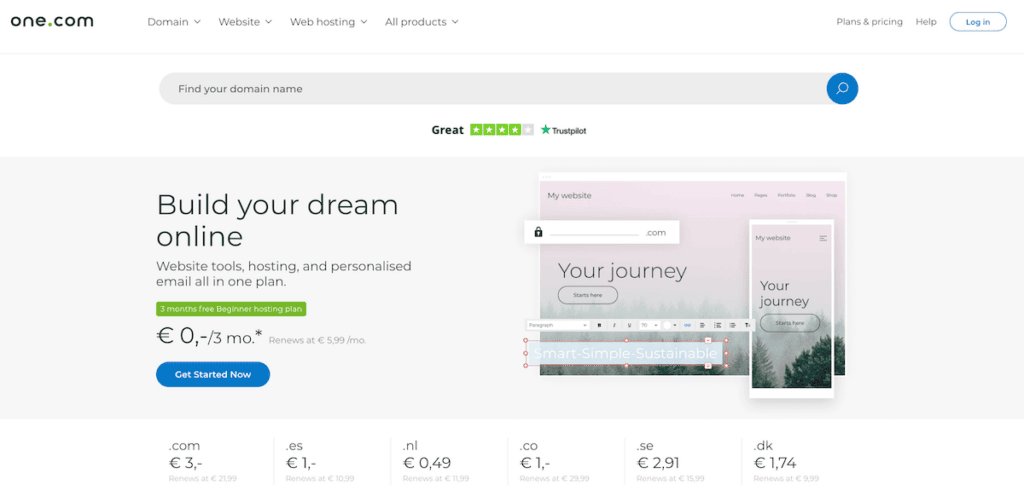
One.com is one thing: cheap. This Danish provider stormed into the website builder (and hosting) market a few years ago offering the lowest prices we’ve seen. They also provide hosting, which is really convenient if you need to use both a website builder and a CMS like WordPress.
But One.com can get expensive. If you are going to need more than 5 pages, you’ll need to get the Explorer plan ($7.48/month). Then it is almost as expensive as Weebly and Webnode (both ranked higher than One.com), and rather limited in features if compared to these.
One.com Pros and Cons
What we like:
- They have templates that look modern and are responsive. These will make your site look great on any device. They also offer solid support that you can reach by email or live chat. Another positive aspect is that they are extremely generous with the storage they offer.
What they should improve:
- Sadly it has some important limitations. For example, if you need a blog it needs to be added separately using another editor. You won’t be able to password-protect your site either as this feature is not included. Another flaw is that their ecommerce system is very basic and only suitable for the smallest online stores.
Free trial: www.one.com
14. Site123
Good with Languages
Languages seem to be Site123’s thing. Not only is the editor available in more than 20 of them (including languages such as Turkish, Arabic, Romanian), they also feature multilingual websites. The editor is relatively restrictive, a bit like GoDaddy Websites. If you just want to get the website job done, without becoming too creative this might suffice. But you have to be aware that their template system can be a bit on the restrictive side.
The cheapest plan that allows you to use your own custom domain name starts at $10.80 per month. Compared to other simple website builders it’s a bit pricey as they will still show a small footer ad in this plan.
Site123 Pros and Cons
What we like:
- Their focus on languages and the fact that they have a decent free plan. Their editor is also user friendly and support is usually fast to answer.
What they should improve:
- More design flexibility would be nice. Also, for a price of $10.80 per month, there should be no ad on the website.
Free trial: www.site123.com
15. Webstarts
Wix’s Little Brother
This All-American website creator claims to host almost 4m websites, of which quite a few are probably free ones. The Webstarts editor and features reminded us a bit of Wix. Their design section has a few gems in it and they also pride themselves on being super flexible. But to be honest, it doesn’t quite live up to Wix’s high standards.
Webstarts Pros and Cons
What we like:
- The free plan is relatively attractive as it offers 1GB of storage and bandwidth. Thankfully the ad isn’t very visible. There is a blogging tool and the Business plan also includes a decent online store.
What they should improve:
- It’s pretty annoying these days to pay extra for an SSL-encrypted site. Webstarts’ $8 per month charge is outright abusive. The mobile-optimized view isn’t included in their cheapest paid plan, which is a bit of a bummer.
Free trial: www.webstarts.com
16. Web.com
The Deceiving One

Alright, you’ve made it this far down the list, now brace yourself.
If you’ve been to other review sites like ours, you may have seen Web.com at the top of their ranking tables. I’ll explain why in a minute.
It’s not that Web.com is a terrible website builder. The product is actually quite okay. It’s user friendly, the templates are pretty nice; under normal circumstances we’d recommend it. But if you look at their terms, you’ll notice that not much is normal about Web.com.
First of all, you need magnifying glasses to figure out their pricing system. The low price of $1.95 per month quickly skyrockets to $10 after the first month. Having said that, I must note that a “month” is 4 weeks for Web.com. That’s right, in Web.com’s calendar, the year has 13 months. And who on this planet dares to charge $38 per year for a .com domain name? Right, Web.com. Not to forget the $1.95 per month on top for privacy protection and $2.33 for an SSL certificate. Needless to say, there is no money-back guarantee.
So back to why so many other website builder review sites love to recommend them: their commissions are some of the highest of the industry. And now you also know how they are able to pay them. At Tooltester we prefer to recommend decent products that don’t try to take advantage of our readers.
Web.com Pros and Cons
What we like:
- The website editor is really solid. They use a grid system, which makes it easy to understand for beginners. The templates aren’t bad either.
What they should improve:
- Apart from all the aforementioned pricing shenanigans, I don’t think any web company should ask their customers to call them to cancel. Obviously, they are only doing it to convince you otherwise. And if you are still interested to hear what I don’t like about the product, be my guest: as organized as the grid system editor is, it’s not very flexible. And you can’t create very deep websites, as the navigation lets you only add one sublevel.
Free trial: web.com (no money-back guarantee)
Tip #5: The latest trend in website building is AI-powered site builders (e.g. Wix ADI and Jimdo Dolphin). Right now, it’s the very beginning of this trend and the website editors are mostly still in its infancy. But if you are looking for an extremely easy way to create a site, do check out our post on the best AI Website Builders.
Let’s now check out a few common questions you might be asking yourself.
Common questions from new website creators
CMS: short for Content Management System. A software that you can use to create, upload and publish your website. For example: WordPress.org and Drupal. This is generally a solution for advanced users who want to create larger websites with more flexibility. Some coding knowledge is usually required.
Website Builder: a simplified version of a CMS, usually for smaller websites. It allows easy website editing and offers predefined designs for you to choose from. It also serves as your web hosting provider. Examples: Wix and Squarespace. See also: What is a website builder?
Theme or Template: Website builders always come with a range of pre-configured designs that you can adapt using the website editor. They are usually optimized for specific use-cases: e.g. portfolio websites, blogs, online stores.
The best website builders also feature templates for specific industries, e.g. restaurants, consultants, musicians and many more. Some even add industry-specific functionality to their themes, such as a reservation system for restaurants or a booking system for yoga studios.
Mobile responsive: when you visit a website on your smartphone, you will notice that it typically looks a bit different from the desktop version on your computer: it’s much narrower and things like a sidebar often disappear entirely. This happens because the website dynamically adapts to the screen size to deliver the best reading experience possible. Almost all website builders offer mobile-responsive designs today.
Apps, extensions, widgets and plugins: you probably know the terms ‘app’ from your smartphone, which can be slightly confusing. When you read about apps here, we typically mean extra features you can add to your website. Wix, for example, has the App Market, where you can find the aforementioned online appointment booking system, for example.
Installing such an app is almost as simple as adding a mobile app to your smartphone. It only requires a few clicks. Other providers use different terminology: Squarespace calls them Extensions and WordPress refers to them as Plugins.
SEO: short for Search Engine Optimization. It’s the art of ranking websites at the top of search results (especially Google’s). While the ranking mostly depends on the quality of your content, there are certain technical factors your website creator needs to accommodate.
For example you need to be able to edit the “meta title” and “meta description” of your web pages. Headlines need to be marked up as headlines in the website’s code. It’s quite a science, really. The important thing for you is that if your goal is to get visitors through Google, you should pick a site builder that offers good SEO (at least 4 stars in our rating).
Drag and drop editor: the best website builders allows you to easily move content blocks (text, images, videos) around on your webpages. You just click on the element you want to move, hold the mouse button, and drop it at the new location. Generally the term refers to a visual website editor that is user friendly because, rather than working on an abstract interface, you edit your website directly in a ‘what you see is what you get’-way (WYSIWYG).
HTML and CSS: all websites use HTML (and typically also CSS) code. It’s nothing you need to worry about too much, as all the products on this page are ‘no-code website builders’. Some of them allow modifications of the code, which caters to a higher level of flexibility. This can be handy since it enables you, or someone else you hire, to edit the design on a more granular level.
Free plans: you may be wondering why many of the companies offer permanently free websites. This comes down to the concept of Freemium. Free website builders let you use a limited version of their product for free but in return, they show an ad for their company on your website.
Another typical limitation is that you can’t use a custom domain name but a subdomain instead that includes the name of the website builder (e.g. yoursite.weebly.com). This is fine for personal projects, but usually not the best idea for a business. The great thing about it is that you have all the time in the world to try out the product.
SSL and HTTPS: this refers to an encryption technology. Basically it means that anything you submit through a website (passwords, contact forms) will be encrypted and not be viewable by the owner of the website. Again, you don’t need to worry about it because all website builders have adopted this technology by now. Some still charge extra for it, which is pretty much a red flag.
Hosting and webspace: this is needed because your website needs to be stored on a server physically. However, the products you find in this article have web hosting and webspace included, so it’s all taken care of.
Over the years, we’ve heard these questions over and over again. I hope we can answer some of yours too! If your question isn’t included here, please feel free to leave a comment at the bottom of this page.
What kinds of sites can be created with a website builder?
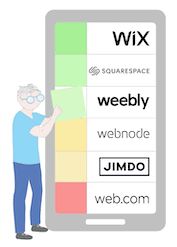 One of the many benefits of website builders is that they offer templates for a range of different industries (check out these templates by Wix, for example). You pick the one you like and just add your own text and images. You don’t have to start from a blank slate, which makes it super easy to achieve impressive results in no time.
Website builders are perfect for small businesses, portfolios, photographers, online stores, restaurants, and hotels, as well as clubs and associations.
In contrast, sites that require a database (real-estate listings, job boards) aren’t so easy to create. They require a different tool and more time. Your best bet in this case: WordPress or Webflow.
Can I really do it myself or do I need a web designer (and what will it cost)?
That’s a really common question and the answer is… well, it depends on a few factors. Please keep in mind that in order to work with a developer you’ll have to be prepared to have a budget of at least $1,500 and that’s the low end. For any changes and further developments, you’ll pay your developer’s hourly rate. Then there is the ongoing hosting as well as domain costs (which will be about $100 per year, more if you want a really fast web host).
Using one of the best website builders, you can calculate roughly $100-150 per year (all-inclusive), depending on the provider you’ll be using. In this guide, you’ll find more details about the cost for a website.
In many cases, it’s actually an excellent approach to familiarizing yourself with the task of creating a website. Even if, in the end, you decide to hire a web designer, you’ll have a much better idea of what person you should be looking for and what your website should look like. Our free ebook “Website Creation for Absolute Beginners” will explain all the important parts of a professional website.
How does this whole domain name thing work?
The domain name is the web address that your website uses. Our domain is called tooltester.com, and you can see it in your browser’s address bar:

Such a domain costs right around $10-15 per year, depending on the top-level domain (for example .com, .co.uk or .net). You can purchase your custom domain name at the usual places such as Namecheap, Google Domains, or GoDaddy.
Next to these paid domain names, there are also free subdomains: yoursite.weebly.com would be an example. Free website builders usually offer that. Obviously, they don’t look as professional as a premium domain name and should not be used in a professional context.
If you are going to use a website builder you can usually purchase a premium domain name there. That makes handling it slightly easier as you’ll only be dealing with one company. If you are going to use WordPress or you’ll be programming the website yourself, you will also need web space, where you can upload your website’s files and data. With a website builder, you don’t need web space as it’ll be already included.
Using your domain name you can also get your very own email address (e.g. [email protected]). That’ll make a much more professional impression than an address from Gmail or Yahoo. This email address can be managed either through your website builder, domain provider, or an external service. Most website builders work with Google Workspace these days. It’s a great service but it comes at a fairly high cost: $6 per email address.
Tip #6: If your website builder doesn’t include free email accounts we recommend using either an affordable solution like Namecheap’s Private Email Hosting (around $10 per year) or Zoho Workplace, which even has a free plan for up to 5 users!
The whole domain and email setup can be a bit confusing so please leave a comment at the bottom of this page if you still have any questions!
How can I add additional functionality to my website?
To improve your website, you may require additional apps like an online booking engine, event planning, site search, live chat, or even a chatbot. The best website builders like Wix, Shopify, WordPress, and Weebly have a dedicated app store where you can add hundreds of plugins with just a few clicks.
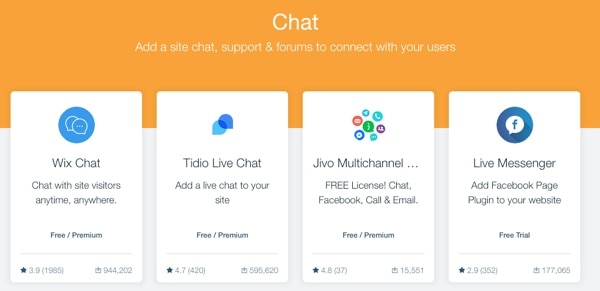 Wix’s App Market
But even if there isn’t an app store you can simply integrate apps using the source code they provide. Usually, that’s as easy as copy & paste.
The best website builders for your specific purpose
Obviously, not all projects are created equal. And it’s true of course that there are easy website builders that are better suited to photographers than to bloggers. Let me now give you our favorites for each use case:
The best small business website builder

For a small business website of no more than 20-30 individual pages, we recommend Wix. Especially if you want the design to be something special. The big advantage is that they have a wealth of templates for all kinds of businesses.
An interesting budget alternative is Hostinger Website Builder. It’s similar to Wix, doesn’t have the same range of features, but is easier to use and much cheaper.
If your website is going to be larger than 30 pages, you should check out Weebly as they have a better system in place to manage a large set of pages. Their selection of templates is not as plentiful, so you’ll have to invest a bit more time into putting together a design.
Finally, if you are not scared of technical challenges and need a website that scales, WordPress.org is probably for you. Thanks to 1000’s of plugins and themes, pretty much everything is possible with WordPress. You just have to invest the time to set it up and to manage its ongoing maintenance.
The best website builder for bloggers

Basically, all website builders on this page have their very own blogging tool integrated. But how good are they? Well, it depends. If you want to do this professionally, you’ll probably be best served using WordPress. There’s also Squarespace (which even supports podcasting) and Wix, which has slightly fewer features but is very easy to use.
And a good intermediate is Webflow, which also has flexible blogging features that are similar to WordPress’s, but whose no-code visual editor makes it a lot easier to customize the design of your blog pages. It requires more technical skills, though.
As running a successful blog is a science in itself, I would recommend checking out our detailed blogging guide and review of 5 Website Builders for Blogging. There you can find hosting options and our template recommendations. We also have some tips if your goal is to build a blog that you monetize using affiliate marketing.
The best website builders for photographers, artists and influencers

Thanks to their fantastic photo galleries, Wix takes the top spot again making it the best website builder for photographers, videographers and also social media influencers. Photography sites and portfolios are an existential part of Wix’s DNA. Just take a look at their photography and design templates to see for yourself. Another great option for creative workers is Squarespace for their tasteful templates and gallery options.
If you are a professional photographer, you might like Pixpa. There you have a proofing functionality that allows you to set up private collections for clients. What’s noteworthy as well, is the specialized online store for photos. We also have specific tips for artist and musician websites in our dedicated articles.
The best ecommerce website builder

Going to start an online store? Fantastic! Ecommerce is an exciting adventure. To begin it you should be well-equipped. If your online store needs to be able to scale, integrate with multiple sales channels, and offer various real-time shipping options, you’ll need a specialized tool like Shopify or BigCommerce. Read our full Shopify review and BigCommerce review for more details.
If you only want to open a small-to-medium sized online store that is easy to use, it probably makes more sense to go with Wix or Squarespace. They are more affordable than the ‘big guns’ and have more than enough to get you started.
If you’re interested in digital products specifically, then check out our guide on how to sell digital downloads.
Tip #7: We often see our readers over-analyzing their website project, spending days comparing every little feature. What usually works much better is to just sign-up for a free trial, dipping your feet into the water! This way you’ll see very quickly whether this is for you or not.
Best Website Builders: Our Conclusion
As you’ve seen, there are a lot of different website tools out there. The most popular website builder according to our own research and the feedback of our readers is Wix. They’ve become a pretty dominant force in the website building business. But that doesn’t mean their competitors are necessarily worse options. It really depends on your use case.
If you are still unsure about what to pick, I’d again recommend running our Smart Finder and answering 5 simple questions. Good luck with your website project!
Congrats! You’ve made it to the very end of this guide. All there is left to say from my side is to leave a comment if you get stuck in the process. We’ll be happy to help you!
FAQ
A website builder, also known as website creator or website maker, is a special kind of content management system (CMS).
While traditional content management systems were designed to administer large websites, website builders were designed with smaller website projects in mind.
This means the user doesn’t require any special programming skills or other technical knowledge, such as knowing how to install a CMS, apply a template or create a database.
If your business is based in the European Union you should aim to fully comply with all the provisions of the General Data Protection Regulation (GDPR). For that, it’s currently necessary to go with a provider that hosts all data within the EU.
In this respect, Jimdo and Webnode are good options. Another possibility is to set up a WordPress site and pick a hosting company with servers in the EU.
We can assume that it will soon be legally acceptable for data to be hosted in the USA again (the USA is by far the most popular hosting location for non-European website builders). The Privacy Shield agreement applied for a long time but was declared invalid by the ECJ in 2020. Rest assured that work on a replacement has already begun, though.
There must be hundreds of thousands of Wix, Weebly, and Shopify websites in the EU that are potentially not in line with the GDPR. Having said that, we haven’t heard of any instances of warnings being issued in response to data being transferred to the USA.
People who benefit most from website building toolkits are small business owners such as freelancers, graphic designers, clubs, bands, or entrepreneurs who sell goods or services via online stores. Website builders are also used to create personal websites and blogs.
So why are these systems so popular? First of all, they allow you to get your website up and running very quickly. And second, they enable you to make changes to your website yourself – without having to pay extra for a programmer.
PC and Mac website software used to be very popular – maybe you can even remember Microsoft Frontpage or Macromedia Dreamweaver, as it used to be called. The advantage of such programs is that you typically pay (a larger amount) upfront and can build as many websites as you like. The downside is that you need to take care of hosting your website yourself, which incurs additional costs.
These days most people clearly prefer hosted website builders such as Wix, Weebly, and Jimdo due to their added simplicity. You can edit your site from different computers, no matter if it’s a Mac or PC. If you absolutely want an installable website builder software, I would recommend you check out Mobirise. The basic version is free, you only pay if you purchase one of their premium designs or extensions.
The authors
Learn more about us

We keep our content up to date
11 Apr 2024 - General updates to Hostinger
10 Oct 2023 - Strikingly review updated and ranking changes
13 Sep 2023 - Deleted irrelevant sections and other corrections
17 Aug 2023 - New Hostinger Website Builder video added
06 Jul 2023 - Wix's new pricing plans added
11 May 2023 - Hostinger Website Builder now has password-protected pages
03 Mar 2023 - Changes to Hostinger pricing
18 Feb 2023 - Zyro is now called Hostinger Website Builder
09 Jan 2023 - External ratings added
02 Jan 2023 - Small correction
28 Dec 2022 - Discount codes updated
15 Dec 2022 - Badges added
27 Sep 2022 - Zyro video review added
12 Sep 2022 - Changes to Zyro plans (Advanced Store no longer available)
16 Aug 2022 - WordPress.com profile updated
15 Jun 2022 - Zyro added
11 May 2022 - Glossary added
02 May 2022 - Duda downgraded from #10 to #11
28 Apr 2022 - Wix.com pricing changes, other smaller updates
20 Apr 2022 - WordPress.com pricing changes
04 Apr 2022 - Changes in rankings: GoDaddy promoted due to new features, Weebly demoted due to lack of updates
14 Mar 2022 – IONOS MyWebsite video review added
15 Feb 2022 – Top section updated
21 Jan 2022 – IONOS MyWebsite added
21 Nov 2021 – Smaller updates
10 Aug 2021 – Web.com profile added
19 Jul 2021 – Weebly moved from #2 to #3 due to lack of new features
13 Jul 2021 – Web.com added
08 Jun 2021 – One more tip added
17 May 2021 – Updated website builder descriptions
30 Apr 2021 – Poll updated
22 Jan 2021 – A few minor updates to our study
21 Oct 2020 – Webflow added to table
05 Oct 2020 – GoDaddy updated
23 Jul 2020 – A couple of smaller updates (Jimdo)
10 Apr 2020 – Removed Ionos website builder: it wasn't an easy decision as Ionos offers an interesting product. Unfortunately, they make it extremely difficult to get access to a test version for us. As we are currently unable to update our review, we had to remove them from our ranking table
25 Nov 2019 – Added section about apps and plugins
19 Nov 2019 – Minor update for Wix
05 Sep 2019 – Squarespace SEO improvements
11 Jun 2019 – Some Squarespace updates
THE BEHIND THE SCENES OF THIS BLOG
This article has been written and researched following a precise methodology.
Our methodology